DocsSEO
Product
SEO
19 pages/seo
SEO gives you 19 tools in the menu — Overview, To-do, Performance, Site Health, Page Fixer, Schema, Keywords, Topics, Page Overlap, Rankings, Competitors, Backlinks, Link Ideas, Outreach, AI Writer, Auto Blog, AI Visibility, Maps Ranking and Reports. Related views sit as tabs at the top of each tool.
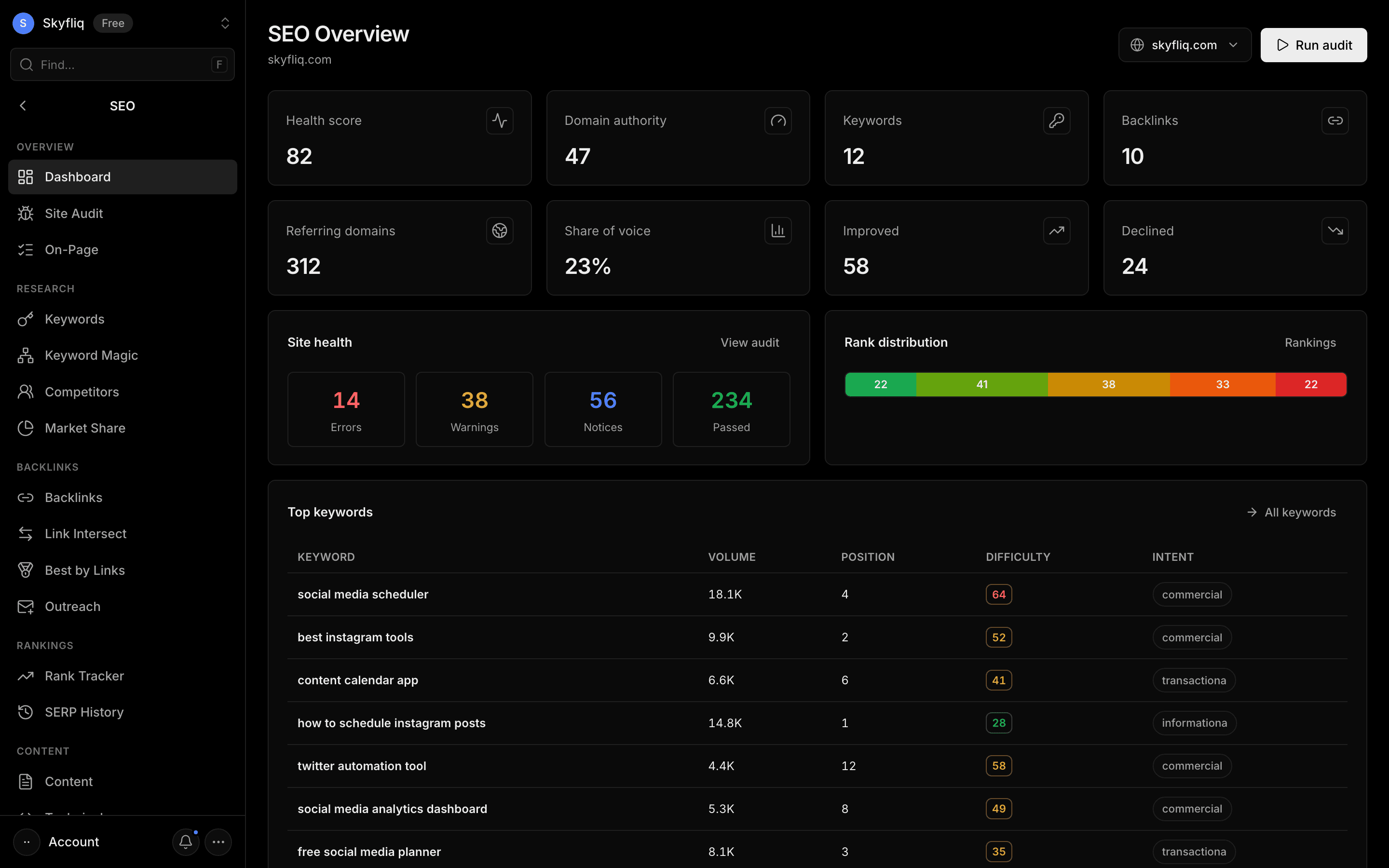
PurposeServe as the SEO command center that surfaces health, keywords, backlinks, and rankings at a glance across all your projects.
app.skyfliq.com/seo Open
How to use
- 1Open SEO → Overview and pick your project
- 2Check the health, authority, keyword and backlink stat cards
- 3Start with the top tasks from your To-do
- 4Use the tabs at the top of each tool for related views
Use caseOpen Overview as your daily starting point, then jump into the tool (and tab) for the job.
Pages in SEO
Each page below has its own guide — description, purpose, how to use, and a screenshot.
OverviewOverview summarizes health score, domain authority, keywords, backlinks, share of voice, site-health issue counts, rank distribution, top keywords and your top tasks.To-doTo-do is your SEO task list, most important first — tasks come from your audit, keywords, Search Console and Flit, and you can add your own, mark them doing or done, or skip them.PerformancePerformance shows your real Google data for the project's site. The Search Console tab has clicks, impressions, CTR and average position versus the previous period, a daily trend, top searches, top pages, countries, devices, sitemap problems and the indexing status of key pages — plus a ranked list of what to fix first. The Revenue tab joins Google Analytics with Search Console to show which pages and searches bring money.Site HealthSite Health crawls your site (100, 500 or 1,000 pages), scores its health and groups problems by type — click any issue to see exactly which pages have it, export them as CSV, and compare any two audits. Tabs: Audit (the crawl), Speed & Tech (Core Web Vitals for your top pages, redirects, canonicals, hreflang, schema validation and internal-link suggestions) and Store Checks (product titles, Product schema, thin descriptions, filter URLs, image alts, stock and variants).Page FixerPage Fixer runs an on-page SEO check: title and meta description length, headings, word count, internal and external links, images missing alt text, canonical, Open Graph and structured data, page speed and an overall on-page score with a list of issues to fix — and on WordPress it can apply the fixes for you. The One Page tab checks a single URL; the Many Pages tab checks up to 50 URLs in one pass (each URL uses 1 paid lookup).SchemaSchema creates structured data (JSON-LD) for Organization, LocalBusiness, Article, Product, FAQ, Breadcrumb, HowTo, Event and Service, checks it for errors, and lets you copy it or add it to WordPress.KeywordsKeywords lets you add and track target terms in a table showing volume, position, change, difficulty, CPC, intent and SERP features, organised into lists. The Find Ideas tab finds up to 1,000 keyword ideas for a seed — phrase match, broad match, related and question keywords — with filters and sorting.TopicsTopics groups your keywords (tracked, keyword lists and Search Console searches) into topics, with total volume and clicks, the page that ranks for each and the gaps that need an article.Page OverlapPage Overlap lists searches where two or more of your own pages compete in Google (free, from Search Console), with each page's clicks and position and what to do — canonical, merge, retarget or internal link.RankingsRankings checks your tracked keywords automatically (daily or weekly) on desktop and mobile, optionally for a city, and shows your keyword ranking distribution — top 3, top 10, top 20 and beyond — plus competitors’ positions, history charts, visibility and recent changes. It emails you when rankings drop and can also use your Google Search Console positions for free. The Results History tab shows how the results page for a keyword changed over time.CompetitorsCompetitors benchmarks rival domains by average position, common keywords, organic traffic and keyword overlap, with a traffic trend per rival. Tabs: Competitors, Keyword Gap (keywords they win and you don't), Market Share (your slice of search visibility) and Look Up a Site (any website's traffic, keywords, top pages and ads — loaded only when you click Load data).BacklinksBacklinks shows your full backlink profile. Tabs: All Links (every link with filters, toxic links and a disavow list you can export for Google), Linking Sites (every website linking to you), Gained & Lost (links won and lost over time), Top Pages and Anchor Text.Link IdeasLink Ideas lists free and easy link ideas — unlinked brand mentions, directories and forums your competitors use, resource pages and guest-post sites — each with why and how. The From Competitors tab finds sites that link to your competitors but not to you.OutreachOutreach manages link-building prospects: contact details, status tracking, email templates with placeholders, a preview of every email before sending, sending from your verified email domain, automatic follow-ups and an opt-out link.AI WriterAI Writer builds a content brief for a keyword from the pages ranking on Google (or your Search Console data): title, meta description, outline, terms and questions to cover — then writes a draft and scores your text live as you edit. The Ideas tab lists content opportunities, thin and decaying pages and questions people ask.Auto BlogAuto Blog researches, writes, illustrates and publishes SEO articles on a schedule — to your Skyfliq blog or a connected CMS — with a content calendar you can edit.AI VisibilityAI Visibility checks whether your brand and website are mentioned or cited in Google AI Overviews and ChatGPT answers for the prompts you choose, with competitors mentioned, citations and history over time.Maps RankingMaps Ranking shows your Google Business Profile, local pack rankings, a map rank grid (how you rank across your area, as a heatmap), NAP consistency and citation listings.ReportsReports turns the data your SEO tools already collected (full, audit, keywords, backlinks or rankings) into a branded PDF with your name, logo and colour — download it, email it, or schedule it weekly or monthly.